Snapshots
What are Snapshots?
Firecracker snapshots capture the complete state of a running microVM, allowing near-instant restoration. Instead of booting from scratch (~2600ms), you can restore a pre-warmed VM in ~300ms.
Status: 45 languages with snapshots in S3 - Total storage ~22.5 GB
Complete Architecture
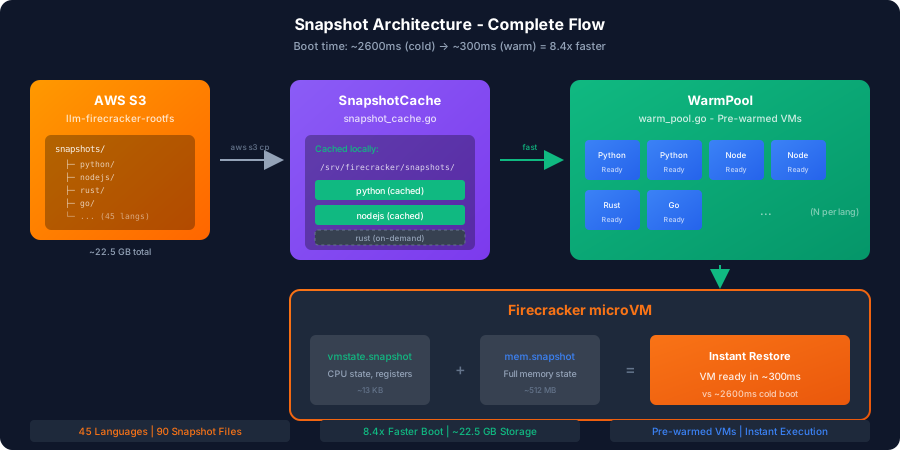
Cold Boot vs Warm Boot

Snapshot Files
| File | Content | Size |
|---|---|---|
vmstate.snapshot | CPU, registers, device state | ~13 KB |
mem.snapshot | Full memory dump | ~512 MB |
Example for each language:
s3://llm-infra-operator-rootfs/snapshots/
├── python/
│   ├── vmstate.snapshot   # ~13 KB
│   └── mem.snapshot       # ~512 MB
├── nodejs/
│   ├── vmstate.snapshot
│   └── mem.snapshot
├── rust/
│   └── ...
└── ... (45 languages total)
Total S3 Storage: ~22.5 GB (90 files)
Creating Snapshots
Prerequisites
- Running Firecracker VM
- VM in a stable state (infra.operator guest ready)
- Sufficient disk space
Step 1: Start VM and Wait
firecracker --api-sock /tmp/fc.sock &
curl --unix-socket /tmp/fc.sock -X PUT \
  "http://localhost/actions" \
  -d '{"action_type": "InstanceStart"}'
sleep 5
Step 2: Pause VM
curl --unix-socket /tmp/fc.sock -X PATCH \
  "http://localhost/vm" \
  -d '{"state": "Paused"}'
Step 3: Create Snapshot
curl --unix-socket /tmp/fc.sock -X PUT \
  "http://localhost/snapshot/create" \
  -H "Content-Type: application/json" \
  -d '{
    "snapshot_type": "Full",
    "snapshot_path": "/srv/snapshots/python/snapshot.vmstate",
    "mem_file_path": "/srv/snapshots/python/snapshot.mem"
  }'
Step 4: Save Rootfs
# Copy the modified rootfs
cp /srv/firecracker/rootfs-python.ext4 \
   /srv/snapshots/python/rootfs.ext4
Restoring Snapshots
Step 1: Start New Firecracker
# Create new Firecracker instance
firecracker --api-sock /tmp/fc-restore.sock &
Step 2: Load Snapshot
curl --unix-socket /tmp/fc-restore.sock -X PUT \
  "http://localhost/snapshot/load" \
  -H "Content-Type: application/json" \
  -d '{
    "snapshot_path": "/srv/snapshots/python/snapshot.vmstate",
    "mem_backend": {
      "backend_type": "File",
      "backend_path": "/srv/snapshots/python/snapshot.mem"
    },
    "enable_diff_snapshots": false,
    "resume_vm": true
  }'
Step 3: Configure vsock (if needed)
# vsock must be reconfigured after restore
curl --unix-socket /tmp/fc-restore.sock -X PUT \
  "http://localhost/vsock" \
  -d '{
    "guest_cid": 3,
    "uds_path": "/tmp/fc-restore.vsock"
  }'
Implementation (Go)
package snapshot

import (
    "encoding/json"
    "fmt"
    "net"
    "net/http"
    "time"
)

type SnapshotManager struct {
    basePath string
}

func NewSnapshotManager(basePath string) *SnapshotManager {
    return &SnapshotManager{basePath: basePath}
}

// CreateSnapshot creates a snapshot of a running VM
func (sm *SnapshotManager) CreateSnapshot(socketPath, lang string) error {
    client := &http.Client{
        Transport: &http.Transport{
            DialContext: func(_ context.Context, _, _ string) (net.Conn, error) {
                return net.Dial("unix", socketPath)
            },
        },
    }

    // 1. Pause VM
    req, _ := http.NewRequest("PATCH", "http://localhost/vm",
        strings.NewReader(`{"state": "Paused"}`))
    req.Header.Set("Content-Type", "application/json")
    resp, err := client.Do(req)
    if err != nil {
        return fmt.Errorf("pause VM: %w", err)
    }
    resp.Body.Close()

    // 2. Create snapshot
    snapshotPath := filepath.Join(sm.basePath, lang)
    os.MkdirAll(snapshotPath, 0755)

    createReq := map[string]string{
        "snapshot_type":  "Full",
        "snapshot_path":  filepath.Join(snapshotPath, "snapshot.vmstate"),
        "mem_file_path":  filepath.Join(snapshotPath, "snapshot.mem"),
    }
    body, _ := json.Marshal(createReq)

    req, _ = http.NewRequest("PUT", "http://localhost/snapshot/create",
        bytes.NewReader(body))
    req.Header.Set("Content-Type", "application/json")
    resp, err = client.Do(req)
    if err != nil {
        return fmt.Errorf("create snapshot: %w", err)
    }
    resp.Body.Close()

    return nil
}

// RestoreSnapshot restores a VM from snapshot
func (sm *SnapshotManager) RestoreSnapshot(socketPath, lang string) error {
    client := &http.Client{
        Transport: &http.Transport{
            DialContext: func(_ context.Context, _, _ string) (net.Conn, error) {
                return net.Dial("unix", socketPath)
            },
        },
    }

    snapshotPath := filepath.Join(sm.basePath, lang)

    loadReq := map[string]interface{}{
        "snapshot_path": filepath.Join(snapshotPath, "snapshot.vmstate"),
        "mem_backend": map[string]string{
            "backend_type": "File",
            "backend_path": filepath.Join(snapshotPath, "snapshot.mem"),
        },
        "enable_diff_snapshots": false,
        "resume_vm":             true,
    }
    body, _ := json.Marshal(loadReq)

    req, _ := http.NewRequest("PUT", "http://localhost/snapshot/load",
        bytes.NewReader(body))
    req.Header.Set("Content-Type", "application/json")
    resp, err := client.Do(req)
    if err != nil {
        return fmt.Errorf("load snapshot: %w", err)
    }
    resp.Body.Close()

    return nil
}
Snapshot Types
Full Snapshot
Captures entire VM state:
{
  "snapshot_type": "Full",
  "snapshot_path": "/path/snapshot.vmstate",
  "mem_file_path": "/path/snapshot.mem"
}
Pros:
- Complete state
- Faster restore
- Self-contained
Cons:
- Larger files
- More disk space
Diff Snapshot (Incremental)
Captures only changes since base:
{
  "snapshot_type": "Diff",
  "snapshot_path": "/path/diff.vmstate",
  "mem_file_path": "/path/diff.mem"
}
Pros:
- Smaller files
- Faster create
Cons:
- Requires base snapshot
- Slower restore (must apply base + diff)
Storage Considerations
Disk Space Requirements
| Language | Memory | Rootfs | Total |
|---|---|---|---|
| Python | 512 MB | 600 MB | 1.1 GB |
| Node.js | 512 MB | 700 MB | 1.2 GB |
| Go | 512 MB | 700 MB | 1.2 GB |
| Rust | 1 GB | 2 GB | 3 GB |
| Bash | 512 MB | 512 MB | 1 GB |
Total for all languages: ~7.5 GB
S3 Storage
Store snapshots in S3 for multi-instance deployment:
aws s3 sync /srv/snapshots s3://llm-infra-operator-rootfs/snapshots/
aws s3 sync s3://llm-infra-operator-rootfs/snapshots/ /srv/snapshots
Best Practices
- Snapshot at the right moment — Create snapshot right after infra.operator guest signals ready.
- Pre-load dependencies — If pre-loading dependencies, snapshot after they're loaded.
- Keep snapshots updated — Recreate snapshots when updating rootfs or infra.operator.
- Use SSD storage — Store snapshots on fast SSD for optimal restore performance.
Snapshot Management
# Directory structure
/srv/snapshots/
├── python/
│   ├── snapshot.vmstate
│   ├── snapshot.mem
│   └── rootfs.ext4
├── nodejs/
│   ├── snapshot.vmstate
│   ├── snapshot.mem
│   └── rootfs.ext4
├── go/
│   └── ...
├── rust/
│   └── ...
└── bash/
    └── ...
Versioning
Track snapshot versions:
{
  "version": "1.0.0",
  "created": "2024-11-29T10:30:00Z",
  "language": "python",
  "infra_operator_version": "0.1.0",
  "rootfs_hash": "sha256:abc123..."
}
Limitations
Snapshots have these limitations:
- Memory-bound: Snapshot size = VM memory size
- Storage needed: Each snapshot requires significant disk
- Firecracker version: Snapshots tied to FC version
- CPU model: Must match between create and restore
- Network state: Network connections not preserved
Using Snapshots with Infra.Operator
Cold Boot Mode (Original)
infra.operator host --lang python --code 'print("hello")'
Warm Boot Mode (8.4x Faster)
infra.operator host --snapshot --lang python --code 'print("hello")'
Available Flags
| Flag | Description | Default |
|---|---|---|
-snapshot | Enable warm boot via snapshot | false |
-cache-dir | Directory for local snapshot cache | /srv/firecracker/snapshots |
-s3-bucket | S3 bucket with snapshots | llm-infra-operator-rootfs |
-s3-region | S3 region | us-east-1 |
Performance Comparison
| Metric | Cold Boot | Warm Boot (Snapshot) | Speedup |
|---|---|---|---|
| Boot Time | ~2600ms | ~300ms | 8.4x |
| First Request | ~3000ms | ~500ms | 6x |
| vmstate size | N/A | ~13 KB | - |
| mem size | N/A | ~512 MB | - |
Real-world results: Boot reduced from ~2600ms to ~300ms = 8.4x faster
Troubleshooting
Restore Fails
Error: snapshot version mismatch
Solution: Recreate snapshot with current Firecracker version.
Memory Load Error
Error: cannot mmap memory file
Solution: Ensure enough available memory on host.
vsock Not Working After Restore
Solution: Reconfigure vsock after restore:
curl --unix-socket /tmp/fc.sock -X PUT \
  "http://localhost/vsock" \
  -d '{"guest_cid": 3, "uds_path": "/tmp/new.vsock"}'
Future Enhancements
- Automatic snapshot creation on rootfs build
- Snapshot validation (checksum)
- Delta snapshots for smaller storage
- Snapshot preloading into memory
- Multi-region snapshot distribution